Scan the label.See what matches your profile.
AllergenLens reads the ingredients on packaged food and highlights anything that matches the allergens and diets you care about — including “may contain” warnings and less obvious names like whey, casein or tahini.
Free to download. Unlimited scans. No account.
A helper, not a guarantee
AllergenLens helps you read labels. It is not medical advice and it can miss things: text can be misread, labels can be incomplete and recipes change. Always read the label on the package, ask the manufacturer when unsure, and if you have a severe allergy, follow your doctor’s plan.
Small print,easier to check.
For anyone managing food allergies, intolerances or a diet — for themselves or for their family.
Features
Built to read carefully.Honest about what it missed.
-
Your profile
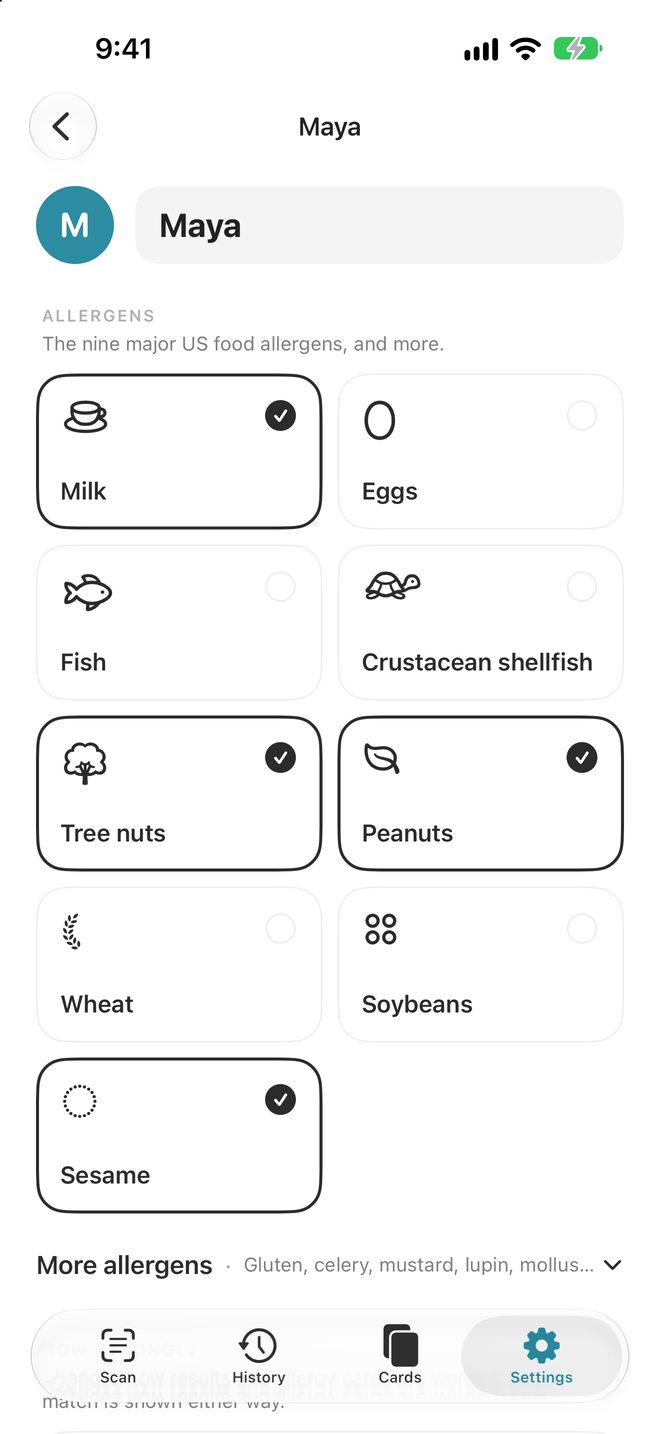
The FDA’s major 9 allergens and the EU’s 14, plus vegan, vegetarian, gluten-free and lactose-free diets. Add ingredients of your own too.
-
Reads the whole label
Scan live or from a photo. AllergenLens finds the ingredients list and the “Contains” and “May contain” statements.
-
Knows other names
Derived ingredients are matched to their allergen — whey and casein to milk, tahini to sesame — and E-numbers with more than one possible source are marked to check.
-
Shows how much it read
A coverage indicator shows how much of the label was read and how clearly, so you know when to take a closer look.
-
Shows its work
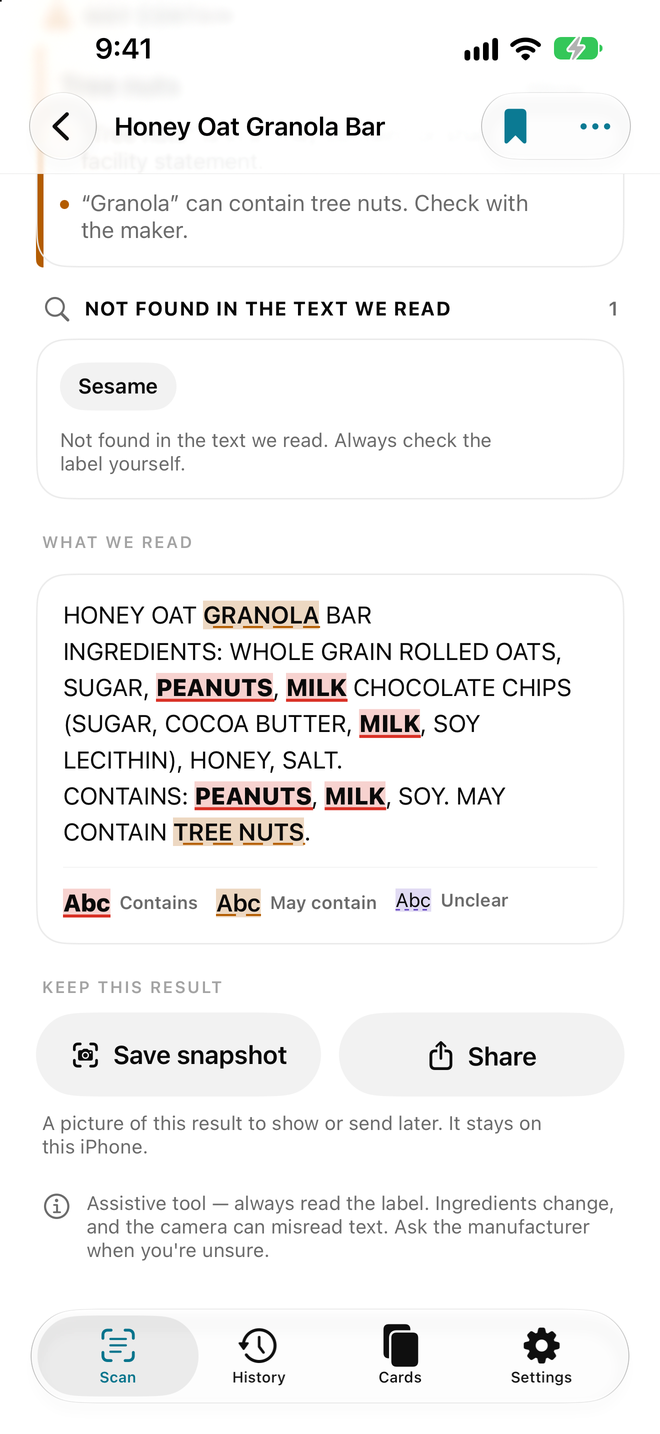
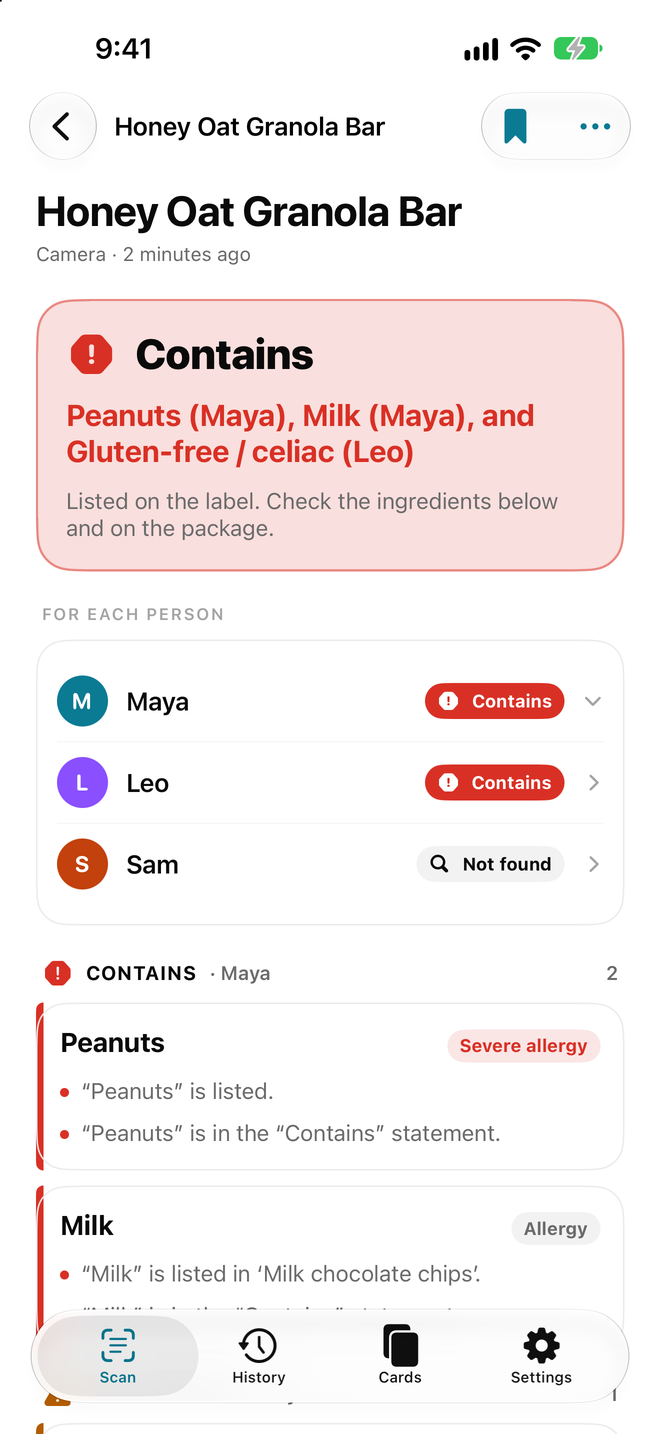
Every word that triggered a flag is highlighted in the text, so you can see exactly why.
-
Travel cards Plus
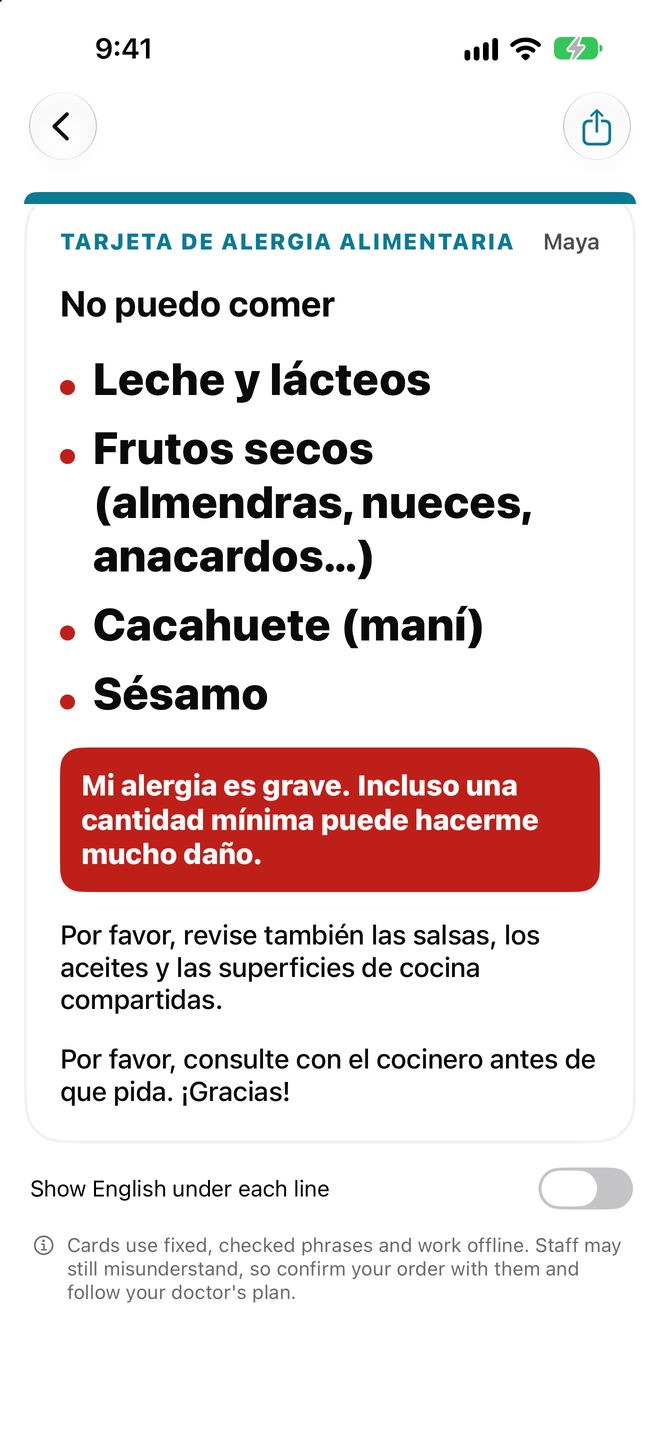
Show a clear allergy card in 9 languages at a restaurant or shop. Works offline.
Eating out and more
Help beyond the label.Staff still have the last word.
-
Read a menu
Photograph a menu or paste its text. Dishes whose name or description mentions something on your profiles are marked. A menu never lists every ingredient, so ask staff about every dish.
-
Questions for staff
Hand over your phone: short questions about sauces, oil and surfaces in the staff’s language, with Yes, No and Not sure buttons. Unclear answers come first in the summary.
-
UK recall alerts, if you want them
Off until you turn them on. AllergenLens fetches the Food Standards Agency’s allergy alerts and matches them on your phone to your profiles and saved products. Nothing about you is sent.
-
Share a profile
Send a profile to a partner or carer as a file or a QR code, or print a one-page summary. It goes straight from phone to phone, never through a server.
-
Explained on your phone
On iPhones with Apple Intelligence, a match can be explained in plain words, on the device. Ask AI shows you a prompt with only the ingredient text, to copy into the AI app you use. AI can be wrong: the label decides.
-
Quicker, and easier with VoiceOver
Start a scan from Control Center, the Lock Screen, the Action button or Siri. With VoiceOver, spoken hints help you fit the whole ingredient list in the frame.
Results
Four clear answers.No false promises.
Every result describes the text AllergenLens read — not the food itself. The decision always stays with you.
Contains
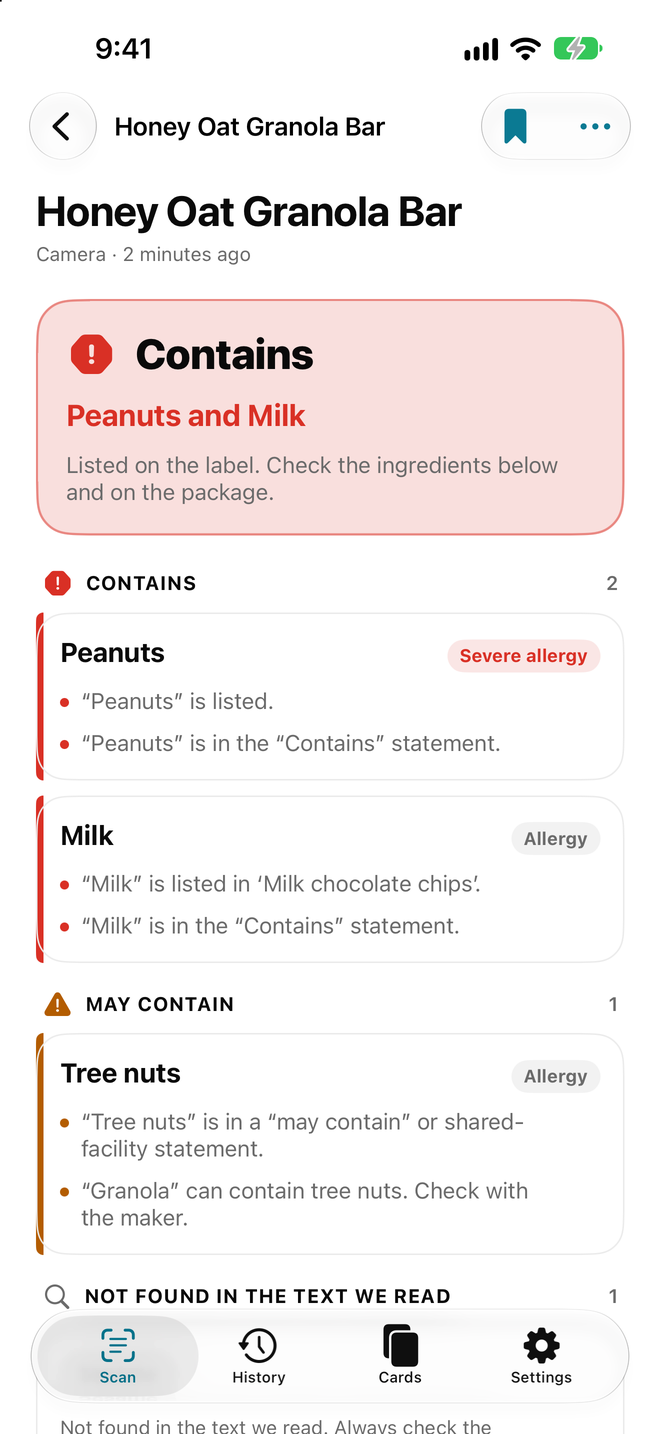
Something from your profile appears in the ingredients or a “Contains” statement.
May contain
The label warns of possible cross-contact, such as “may contain” or “made in a facility that also handles”.
Not found in the text we read
Nothing from your profile was matched in the text that was read. That isn’t a guarantee — read the label yourself.
Couldn’t read clearly
Part of the label was blurry, cut off or too small to read with confidence. Scan again or read it yourself.
How it works
Set up once.Scan every time.
-
Set your profile
Choose the allergens and diets that matter to you, and add any ingredients of your own.
-
Scan the label
Point the camera at the ingredients, or pick a photo. AllergenLens finds the ingredients and allergen statements.
-
Check the result
See what matched, highlighted in the text, and how much of the label was read. Then read the label yourself.
Screenshots
A closer lookat AllergenLens.
Pricing
Every warning is free.Plus is for the family.
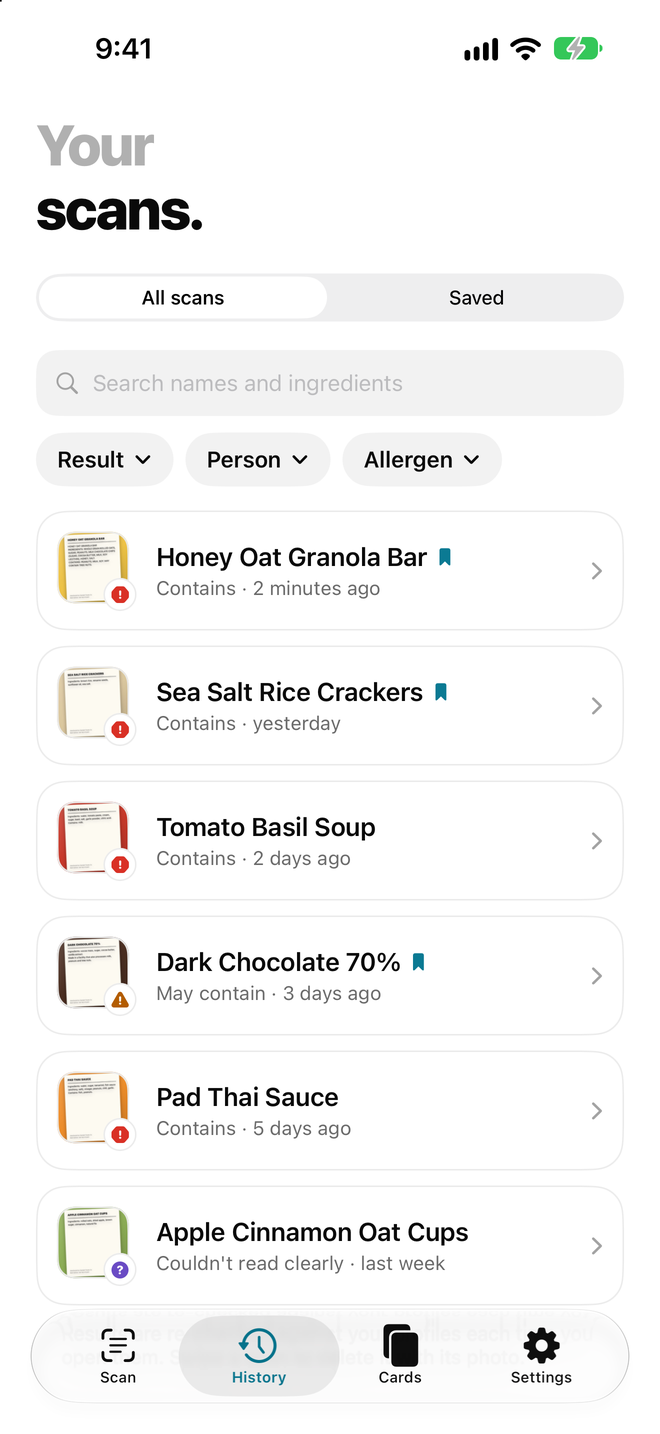
Scanning and every warning are free, with no scan limit. Plus adds family profiles, history and travel cards.
Free
$0
- One allergy and diet profile
- Unlimited scans, live or from photos
- Contains, May contain and unclear-text warnings
- Other ingredient names and E-numbers to check
- Coverage indicator and highlighted matches
- Your last scan, plus a preview of travel cards
No account and no ads.
AllergenLens Plus
For the whole family, and the trip.
Everything in Free, plus:
- Up to 6 family profiles, with Whole family mode to check everyone at once
- Scan history and saved products
- Travel allergy cards in 9 languages, full screen and offline
- Export travel cards as image or PDF
-
Yearly 7-day free trial
Best value, billed once a year
$14.99per year
-
Monthly 50% off for 3 months
$1.49 a month for the first 3 months, then $2.99 a month
$2.99per month
-
Lifetime
One payment, nothing renews
$29.99once
Warnings are never behind a paywall. Plus adds convenience, not protection.
Prices in USD; your store shows the price for your country or region. Payment is charged to your Apple ID or Google Play account. Subscriptions renew automatically unless cancelled at least 24 hours before the end of the current period, and you can manage or cancel them anytime in your store account settings. If you start the free trial, the yearly plan begins when the trial ends unless you cancel before then. The monthly introductory price is for new subscribers: $1.49 a month for the first 3 months, then $2.99 a month. Lifetime is a one-time purchase that doesn’t renew.
Privacy
Your health detailsstay on your phone.
-
Stays on your phone
Profiles, label photos and results are stored and read on the device. There is no AllergenLens server. The only request the app makes by itself is the optional UK recall check, which sends nothing about you.
-
Health details stay private
Your allergies and diets are never sent to analytics, advertisers or us.
-
No account
No sign-up and no password. Set up your profile and scan.
-
No ads, no tracking
No advertising and no tracking across other apps or websites.
Anonymous usage stats, your choice
We count which screens and features are used and collect crash reports, never your allergies, diets or scans. Turn it off anytime in Settings.
Can AllergenLens decide what I can eat?
No. It shows what it found in the text it read, so you can check faster. Always read the label on the package, ask the manufacturer when unsure, and if you have a severe allergy, follow your doctor’s plan.
Which allergens does it cover?
The FDA’s major 9 — milk, eggs, fish, crustacean shellfish, tree nuts, peanuts, wheat, soybeans and sesame — plus the rest of the EU’s 14: cereals containing gluten, celery, mustard, lupin, molluscs and sulphites. You can also add your own ingredients.
What does “Not found in the text we read” mean?
Only that nothing from your profile was matched in the text AllergenLens read. Labels can be incomplete or misread, so read the label yourself.
Why does it flag things I didn’t expect?
When in doubt, it errs toward flagging, and it matches other names too — whey counts as milk, tahini as sesame. Tap a result to see the highlighted words behind it.
Which labels can it read?
Printed ingredient lists on packaged food, in English, Spanish, French, German, Italian, Portuguese, Dutch, Polish and Swedish.
Does AllergenLens use AI?
Only if you ask. On iPhones with Apple Intelligence, Explain in plain words runs on the device, and the answer is marked as AI-generated. Ask AI shows you a prompt you can read first, then hands it to ChatGPT, Claude, Gemini or another AI app you choose. It holds only the ingredient text and what was found, never your name or profile. AI can be wrong: always read the label and ask staff or the manufacturer.
Does the app connect to the internet?
Only for the optional UK recall alerts, which are off until you turn them on. Then AllergenLens fetches the public allergy alert list from the Food Standards Agency (data.food.gov.uk). The request is the same for everyone and nothing about you is sent; matching happens on your phone.
Is my allergy information private?
Yes. Your profiles and scans stay on your phone. They are never sent to us or to analytics, and there’s no account.
What does Plus add?
One scan checked for Maya, Leo and Sam in Whole family mode, scan history and saved products, and travel allergy cards in 9 languages. Every warning stays free.
How do I delete my data?
Go to Settings and tap Erase all data. This deletes every profile, scan and saved product on your phone. Deleting the app does the same.
Read labels witha second pair of eyes.
Download AllergenLens for free. Plus starts with a 7-day free trial.
Not medical advice. AllergenLens can miss things — always read the label.